Core Web Vitals represent Google’s shift from purely content-based ranking signals to experience-driven performance signals. For WordPress websites, this change is significant because WordPress relies heavily on PHP execution, theme architecture, plugins, and front-end assets, all of which directly impact user experience metrics.
Unlike traditional speed metrics such as “page load time,” Core Web Vitals are based on real user interactions captured through Chrome User Experience Report (CrUX). This means optimizations must work in real-world conditions, including slow networks, mid-range mobile devices, and inconsistent connectivity.
From an SEO standpoint, Core Web Vitals influence:
- Page Experience signals
- Mobile rankings
- Crawl efficiency
- Engagement metrics like bounce rate and dwell time
More importantly, they align closely with Google’s E-E-A-T framework, particularly Experience and Trustworthiness. A slow, unstable, or unresponsive site signals poor quality regardless of content depth.
This guide focuses on practical, technically sound optimization strategies specifically for WordPress, covering server-side performance, front-end rendering, JavaScript execution, and layout stability. The goal is not just to “pass” Core Web Vitals, but to build a performance-resilient WordPress site that scales without degrading user experience.
What Are Core Web Vitals: Technical Overview and Measurement Model
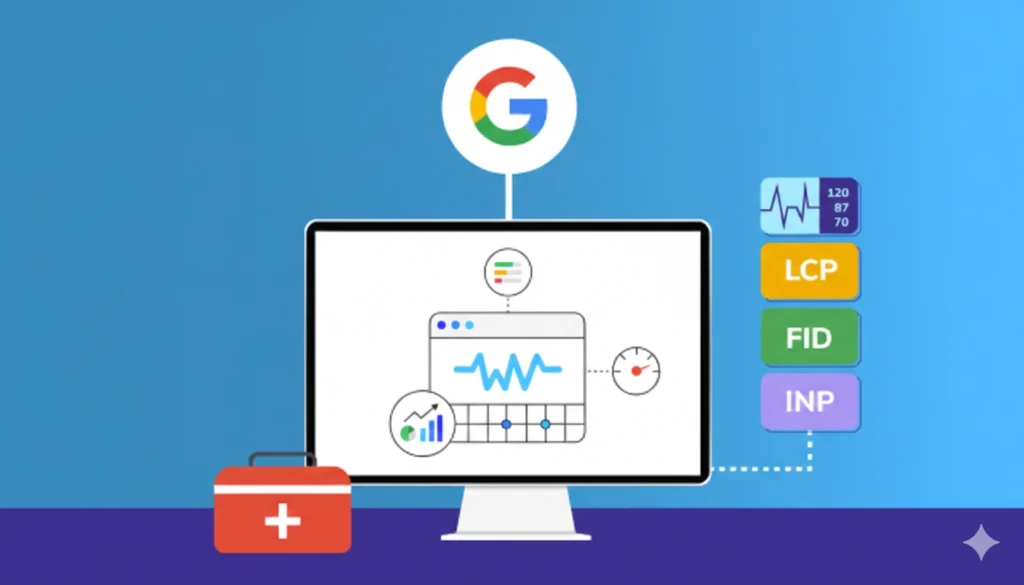
Core Web Vitals are a set of user-centric performance metrics designed to measure how users perceive speed, stability, and responsiveness. These metrics are collected as field data, meaning they reflect actual user experiences rather than controlled lab conditions.
The three metrics are:
- Largest Content-ful Paint (LCP) – loading performance
- Cumulative Layout Shift (CLS) – visual stability
- Interaction to Next Paint (INP) – interaction responsiveness
Google evaluates these metrics at the 75th percentile, which means optimization must work for many users, not just ideal environments. This is especially important for WordPress sites that rely on shared hosting, page builders, or multiple plugins.
Core Web Vitals data is sourced from:
- Chrome browsers
- Real user sessions
- Aggregated over a 28-day window
This data is surfaced in:
- Google Search Console
- Page Speed Insights (field data section)
A critical technical point is that lab tools alone cannot guarantee ranking improvements. Lighthouse scores may improve while field data remains poor due to real-world bottlenecks like server latency or third-party scripts.
Successful Core Web Vitals optimization requires understanding how browsers parse HTML, execute JavaScript, construct the render tree, and paint pixels, all of which are heavily influenced by WordPress architecture.
Largest Contentful Paint (LCP): Rendering Performance and Critical Content Delivery
Largest Contentful Paint measures the time it takes for the largest visible element in the viewport to render fully. In WordPress, this is most often a hero image, featured image, or large heading block.
Technically, LCP ends only when:
- The resource is downloaded
- Parsed and decoded
- Painted to the screen
Common LCP elements include:
- <img> elements
- Background images loaded via CSS
- Large text nodes inside containers
Poor LCP is typically caused by delays in the critical rendering path, which includes server response, CSS parsing, JavaScript execution, and image delivery.
WordPress-specific LCP issues often stem from:
- Slow PHP processing
- Database query overhead
- Render-blocking stylesheets
- Late-loaded hero images
- Bloated themes or builders
Optimizing LCP requires prioritising the critical above-the-fold content. This includes:
- Reducing Time to First Byte (TTFB)
- Preloading LCP resources
- Inlining critical CSS
- Avoiding lazy loading on LCP images
From an SEO perspective, LCP directly affects perceived speed, which strongly correlates with bounce rate and engagement. Google considers LCP under 2.5 seconds as “good,” but competitive sites often target sub-2-second LCP for consistency across devices.
Optimizing LCP in WordPress: Server, Assets, and Rendering Strategy
LCP optimization in WordPress must begin at the server level, because front-end optimizations cannot compensate for slow backend responses. Hosting quality, PHP version, and database efficiency all directly affect LCP.
Key server-side optimizations include:
- Using PHP 8.x for faster execution
- Enabling OPcache
- Implementing object caching (Redis/Memcached)
- Choosing hosting with low TTFB and HTTP/2 or HTTP/3
On the front end, LCP optimization focuses on resource prioritization. The browser must be told explicitly which resources are critical.
Best practices include:
- Preloading the LCP image using <link rel=”preload”>
- Serving images in WebP or AVIF formats
- Using responsive images (srcset)
- Avoiding CSS background images for LCP elements
CSS handling is equally critical. Render-blocking CSS delays LCP because the browser must build the CSSOM before painting. Solutions include:
- Extracting and inlining critical CSS
- Deferring non-critical stylesheets
- Minifying CSS files
Finally, lazy loading must be used selectively. Lazy loading the LCP image is a common mistake that significantly worsens performance. Only below-the-fold images should be lazy loaded.
Cumulative Layout Shift (CLS): Visual Stability and Layout Integrity
Cumulative Layout Shift measures how much the visible layout shifts unexpectedly during the page lifecycle. CLS is calculated using impact fraction × distance fraction whenever an element moves without user interaction.
In WordPress, CLS issues are widespread due to dynamic content injection, late-loaded assets, and page builder behavior. Even small shifts can accumulate into a poor CLS score.
The most common CLS triggers include:
- Images without defined dimensions
- Web fonts causing FOIT or FOUT
- Ads injected dynamically
- JavaScript inserting DOM elements
- Animated UI components
From a browser perspective, layout shifts occur when the rendering engine must recalculate layout (reflow) after content has already been painted.
CLS is especially harmful for:
- Mobile users
- Conversion-focused pages
- E-commerce and lead forms
Google considers CLS below 0.1 as good, but stability should be treated as a design and engineering principle, not just a metric.
CLS directly affects trust. Unexpected movement can cause misclicks, frustration, and abandonment, signals that negatively influence SEO performance and user satisfaction.
Optimizing CLS in WordPress: Layout Control and Asset Stability
The foundation of CLS optimization is predictable layout behavior. Browsers need to know how much space to reserve before assets load.
The most effective CLS fixes include:
- Always defining width and height for images and videos
- Using CSS aspect-ratio boxes
- Ensuring embeds load within fixed containers
Font loading is another major CLS contributor. Best practices include:
- Preloading critical fonts
- Using font-display: swap
- Limiting font families and weights
For ads and third-party embeds:
- Reserve fixed-size containers
- Avoid injecting content above existing elements
- Use overlays instead of pushing content down
JavaScript must also be controlled. DOM manipulations that alter layout after paint should be avoided or delayed until after initial rendering.
Page builders often introduce CLS through:
- Dynamic spacing calculations
- Late-rendered widgets
- Animation effects
Reducing CLS requires auditing templates, not just plugins. A stable layout must be designed intentionally, especially for above-the-fold content.
Interaction to Next Paint (INP): Responsiveness and JavaScript Execution
Interaction to Next Paint (INP) measures how quickly a page responds to all user interactions, not just the first one. It captures the worst interaction latency, making it a more comprehensive metric than First Input Delay (FID).
INP includes:
- Input delay
- JavaScript execution time
- Rendering and painting
In WordPress, INP issues are almost always caused by JavaScript overload. Themes, plugins, analytics tools, and page builders all compete for main-thread execution time.
Common INP problems include:
- Long JavaScript tasks (>50ms)
- Excessive event listeners
- Synchronous script execution
- Heavy third-party scripts
Poor INP results in:
- Delayed clicks
- Laggy menus
- Unresponsive forms
Google considers INP under 200ms as good. Achieving this consistently requires controlling how and when JavaScript executes.
Optimizing INP in WordPress: Main Thread and Script Management
INP optimization focuses on reducing main-thread blocking. The browser can only process one task at a time, so long JavaScript tasks must be eliminated or deferred.
Key strategies include:
- Removing unused plugins
- Choosing lightweight themes
- Avoiding bloated page builders
- Splitting JavaScript bundles
Script loading should follow a priority model:
- Critical scripts load early
- Non-critical scripts are deferred
- Third-party scripts load after interaction
Techniques such as:
- defer and async
- Delayed script execution
- Event-based loading
significantly improve responsiveness.
Long tasks should be broken into smaller chunks using:
- requestIdleCallback
- Asynchronous processing
- Avoiding heavy computations on load
INP optimization is ongoing. Each new plugin or feature must be evaluated for its JavaScript cost. Responsiveness is a system-level concern, not a single fix.
Measuring Core Web Vitals Correctly: Data Interpretation and Monitoring
Accurate measurement is critical. Many site owners misinterpret lab scores as ranking signals.
Key distinctions:
- Field data = ranking impact
- Lab data = diagnostics only
Primary tools:
- Google Search Console (Core Web Vitals report)
- PageSpeed Insights (field data section)
Monitoring should be continuous. Performance regressions often occur after:
- Theme updates
- Plugin installations
- Content changes
Core Web Vitals optimization must be part of technical SEO maintenance, not a one-time project.
Conclusion: Building a Performance-Resilient WordPress Website
Optimizing WordPress Core Web Vitals requires technical discipline, architectural awareness, and ongoing monitoring. It is not about chasing scores, but about delivering consistently fast, stable, and responsive experiences.
By addressing:
- LCP through efficient rendering
- CLS through layout stability
- INP through JavaScript control
you create a WordPress site that aligns with Google’s quality expectations and delivers real value to users. Performance is no longer optional; it is a core trust signal.
Want to improve your WordPress Core Web Vitals and SEO performance?
If your site is struggling with LCP, CLS, or INP, I can audit your setup, identify real performance bottlenecks, and create a clear optimization plan.
Contact me today to optimize your WordPress website for speed, stability, and better search rankings.